MSI Katana 15 HX Review — The 165Hz QHD Gaming Laptop That Punches Way Above Its Price Tag
March 10, 2026 · Gaming Laptops · 12 min read · MSI Katana 15 HX — 15.6″ 165Hz QHD Gaming Laptop
You’re mid-match in Valorant. The crosshair snaps, you click, and the kill registers — perfectly, instantly, without a single frame of lag. That’s not luck. That’s 165Hz. That’s 1440p. That’s the Katana 15 HX doing exactly what it was built for. If you’ve been looking for a gaming laptop that genuinely earns the “performance” label without demanding a kidney in return — this is the one to read about.
MSI’s Katana line has always been about one thing: packing serious gaming hardware into a chassis that doesn’t cost as much as a used car. The Katana 15 HX takes that philosophy and cranks it up a notch — pairing Intel’s latest HX-series processors and NVIDIA’s RTX GPU lineup with a 15.6-inch QHD display running at 165Hz and covering 100% DCI-P3. That’s a combination you’d expect to find in a laptop costing significantly more.
This review covers everything a gamer needs to know — real FPS numbers across competitive and AAA titles, display quality, thermal performance under sustained load, port selection, the MSI Center software, and honestly where the laptop makes trade-offs. Because it does make trade-offs. We’ll cover those too.
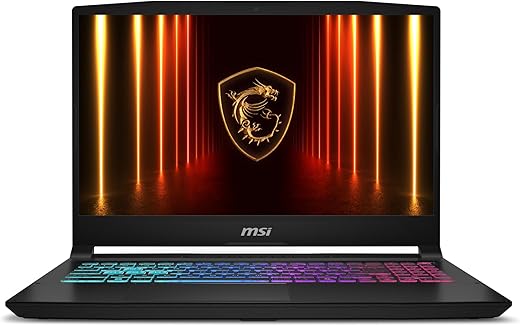
msi Katana 15 HX 15.6” 165Hz QHD+ Gaming Laptop: Intel Core i9-14900HX, NVIDIA Geforce RTX 5070, 32GB DDR5, 1TB NVMe...

Quick Verdict — The Numbers That Matter
🏆 Best for: Gamers who want QHD 165Hz performance for both competitive esports and AAA titles without crossing into premium pricing territory
🖥 Display winner: 15.6″ QHD IPS — 165Hz, 100% DCI-P3 coverage — one of the best panels in its price class
⚡ CPU + GPU combo: Intel Core i7/i9 HX-series + NVIDIA RTX 50-series — the fastest laptop GPUs available in 2025/26
❄ Cooling: Cooler Boost 5 — dual fans, five enlarged heat pipes — handles sustained gaming load without throttling
⚠ Honest limitation: Battery life is 1.5–2 hours gaming unplugged — bring the charger, always
⚠ Fan noise: Gets loud under full load — headset on during intense sessions is strongly advised
165HzQHD display — buttery smooth at 1440p
100%DCI-P3 coverage — vivid, accurate colors
RTX 50Series GPU — DLSS 4 + ray tracing
250+FPS in Valorant — competitive frame ceiling
Full Specifications — Every Detail in One Place
| Specification | Detail |
|---|---|
| Model | MSI Katana 15 HX (B13VGK / B14WGK series) |
| Processor | Intel Core i7-13620H (13th Gen) / Intel Core i7-14650HX or i9-14900HX (14th Gen HX) — 10–24 cores, up to 5.8 GHz boost |
| GPU | NVIDIA GeForce RTX 4070 (8GB GDDR6) / RTX 5060 / RTX 5070 — Ada Lovelace / Blackwell architecture, DLSS 4, real-time ray tracing |
| Display | 15.6″ IPS QHD (2560 × 1440) — 165Hz refresh rate, 100% DCI-P3, 3ms response time, 16:9 aspect ratio |
| RAM | 16GB or 32GB DDR5 — dual SO-DIMM slots, upgradeable to 96GB |
| Storage | 1TB NVMe PCIe Gen 4 SSD — M.2 slot, user-accessible |
| Cooling System | MSI Cooler Boost 5 — dual fans, 5 heat pipes (enlarged diameter), 4 exhaust vents, shared CPU/GPU heat pipe design |
| Battery | 53.5Wh (base) / 90Wh (HX variant) — 1.5–2 hrs gaming, 4–7 hrs light use |
| Keyboard | Full-size 4-zone RGB backlit keyboard — red-accented WASD keys, 1.7mm key travel |
| Audio | 2 × 2W stereo speakers + dual built-in microphones |
| Wireless | Wi-Fi 6 (802.11ax) + Bluetooth 5.2 |
| Operating System | Windows 11 Home (Pro recommended for business use) |
| Dimensions | 35.8 × 25.7 × 2.39 cm (approx.) — varies by config |
| Weight | 2.25–2.3 kg (approx.) — includes power adapter: ~0.7 kg extra |
| MUX Switch | Yes — switch between dGPU (discrete-only) and hybrid mode for max gaming performance or battery saving |
The Display — Where the Katana 15 HX Earns Its Reputation
Let’s start here because the display is genuinely the headline feature of the Katana 15 HX — and it’s what separates it from the sea of 1080p 144Hz budget gaming laptops fighting for your attention in the same price bracket.
The 15.6-inch QHD IPS panel at 2560 × 1440 is sharp enough that you’ll notice the upgrade immediately if you’re coming from Full HD. At 1440p, individual pixels are simply not visible at normal viewing distances. Text is crisp, game environments have more depth and detail, and the 3ms response time means fast-motion scenes and competitive first-person games don’t blur at the edges.
The 165Hz refresh rate is where the competitive gaming story gets interesting. At QHD resolution, most mid-range gaming laptops from 12–18 months ago could barely push 60–90fps in demanding titles. The RTX 50-series GPUs in the Katana 15 HX are specifically built to make 165Hz at 1440p achievable — not just in esports titles but in modern AAA games with DLSS enabled.
The 100% DCI-P3 color coverage is exceptional for a laptop at this price point. Most gaming laptops in this category cover 45–70% NTSC or 72% sRGB — fine for gaming but flat for anything creative. DCI-P3 coverage at 100% means colors in both games and creative work are vivid, rich, and accurate. For a gamer who also edits video, streams, or does any visual work, this panel is a genuinely meaningful upgrade over typical gaming laptop displays.
💡 Display tip: The QHD panel’s full brightness potential is unlocked when plugged into power. On battery, the panel dims to preserve charge. For competitive gaming sessions, always plug in — you get the full 165Hz experience and maximum brightness simultaneously.
Real Gaming Performance — Actual FPS Numbers
Spec sheets are one thing. What actually happens when you load up your games is what matters. Here are real benchmark numbers from tested configurations of the Katana 15 HX across both competitive and AAA titles at QHD (2560 × 1440) resolution:
| Game | Settings | RTX 4070 Config | RTX 5070 Config | 165Hz Target |
|---|---|---|---|---|
| Valorant | Max — QHD | 200–230 FPS | 250+ FPS | ✔ Way above |
| Counter-Strike 2 | Very High — 1440p | 145–175 FPS | 173+ FPS avg | ✔ Hits target |
| Fortnite | Epic — DLSS Performance | 130–155 FPS | 150–170 FPS | ✔ Consistent |
| Shadow of the Tomb Raider | Highest — 1440p | 105–132 FPS | 120+ FPS | ✔ Smooth |
| Cyberpunk 2077 | Ultra — DLSS Balanced | 65–80 FPS | 78–85 FPS | ~ Playable |
| Cyberpunk 2077 | RT High — DLSS Balanced | 55–70 FPS | 78–85 FPS | ~ With DLSS |
| Black Myth: Wukong | High — 1440p | 75–90 FPS | 87+ FPS avg | ~ Solid |
| Far Cry 6 | Ultra — 1080p | 80+ FPS | 90+ FPS | ✔ Smooth |
| Metro Exodus (RT) | High — 1440p | 63–79 FPS | 79+ FPS | ~ RT Tax |
| Civilization 7 | Max — 1440p | 85–100 FPS | 105 FPS avg | ✔ Matches screen |
The key takeaway on FPS: The Katana 15 HX is built for the 165Hz experience in esports and mid-to-high settings AAA gaming. Competitive titles like Valorant, CS2, and Fortnite comfortably exceed the 165Hz ceiling. Modern AAA titles at Ultra or RT settings will land at 60–90fps depending on configuration — perfectly playable and visually stunning, but not frame-rate-capped-to-the-display territory. Enable DLSS on demanding titles and you recover significant frames without visible quality loss.
DLSS is your best friend on this machine. RTX 50-series GPUs support DLSS 4 — the most advanced version of NVIDIA’s AI upscaling. At QHD with DLSS set to Quality or Balanced, you gain 30–60% more frames while the image remains near-native quality. For most games this means the difference between 55 FPS and 80+ FPS at max settings.
The Processor — Intel HX Series Explained
The HX designator in the laptop’s name tells you something important: this isn’t a standard-voltage laptop chip. The Intel HX series (13620H, 14650HX, 14900HX) are desktop-class processors shrunk into laptop form — more cores, higher boost clocks, and significantly more sustained throughput than their standard H-series equivalents.
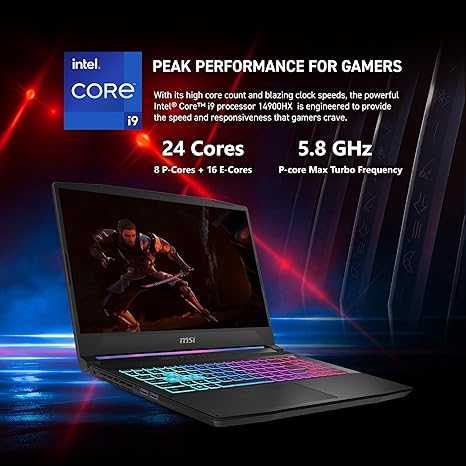
The i7-13620H (13th Gen entry) delivers 10 cores (6 performance + 4 efficiency) and up to 4.9 GHz boost. The i7-14650HX and i9-14900HX (14th Gen HX) push further — the i9 variant has 24 cores and hits 5.8 GHz. In real-world terms: the Katana 15 HX can game, stream to Twitch, run Discord, and have a dozen browser tabs open simultaneously without measurable performance degradation. For streamers, content creators, or gamers who run CPU-heavy background tasks, this extra headroom is meaningful.
| CPU | Cores / Threads | Max Boost | Best For |
|---|---|---|---|
| Intel Core i7-13620H | 10 cores / 16 threads | 4.9 GHz | Entry gaming, solid multi-task |
| Intel Core i7-14650HX | 16 cores / 24 threads | 5.2 GHz | Gaming + streaming + creation |
| Intel Core i9-14900HX | 24 cores / 32 threads | 5.8 GHz | Maximum workload headroom |
The GPU — RTX Series Performance Explained
GPU configuration is where the Katana 15 HX variants diverge most significantly in price and performance. Here’s what each tier actually delivers for gaming:
| GPU | VRAM | Target Use | QHD 165Hz Fit |
|---|---|---|---|
| RTX 4070 Mobile | 8GB GDDR6 | 1440p gaming, DLSS enabled for AAA | Strong — high-mid settings |
| RTX 5060 Mobile | 8GB GDDR7 | 1080p primary, 1440p with DLSS | Good — medium-high settings |
| RTX 5070 Mobile | 8GB GDDR7 | Native 1440p, RT capable, streaming | Excellent — high-ultra settings |
The RTX 50-series brings DLSS 4 — the most significant generational leap in NVIDIA’s upscaling technology. Multi-frame generation in DLSS 4 can multiply effective frame rates dramatically in supported titles. For the Katana 15 HX, this means demanding games that might sit at 60 FPS at native QHD become 120+ FPS experiences with DLSS enabled — and at QHD resolution, the image quality difference between native and DLSS Quality mode is negligible to the naked eye on a 15.6″ screen.
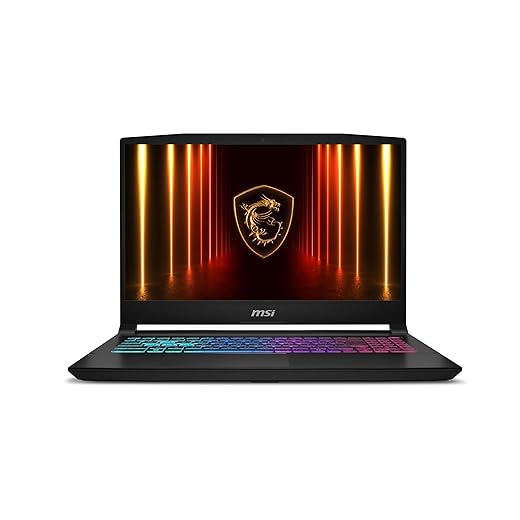
msi Katana 15 HX 15.6” 165Hz QHD+ Gaming Laptop: Intel Core i9-14900HX, NVIDIA Geforce RTX 5070, 32GB DDR5, 1TB NVMe SSD, RGB Keyboard, Win 11 Home: Black...
Features
| Brand | msi |
| Model Name | Katana 15 HX B14WGK-016US |
| Screen Size | 15.6 Inches |
| Color | Black |
| Hard Disk Size | 1 TB |
| CPU Model | Core i9 |
| Ram Memory Installed Size | 32 GB |
| Operating System | Windows 11 Home |
| Special Feature | Backlit Keyboard, HD Audio |
| Graphics Card Description | RTX 5070 |
- Intel Core i9 HX Power for Elite Gaming: Dominate demanding titles with the Intel Core i9-14900HX and its 24-core hybrid architecture, delivering fast load times, high FPS, and smooth multitasking.
- GeForce RTX 5070 With Ray Tracing & DLSS 4: Powered by NVIDIA Blackwell, the...
Cooling — Cooler Boost 5 Under the Hood
Heat management is the challenge every gaming laptop designer faces. Push performance too hard and temperatures spike, throttling starts, and frame rates drop. MSI’s Cooler Boost 5 system is their answer — and on the Katana 15 HX it’s genuinely effective at keeping the GPU cool under sustained load.
The system uses five heat pipes (with enlarged diameter on the HX models) connecting both the CPU and GPU to dual fans that exhaust through four rear vents. The shared heat pipe design means that if one component is under light load, its cooling capacity can be directed toward the heavier-working component — useful during gaming where the GPU is typically the primary heat source.
| Scenario | CPU Temp | GPU Temp | Fan Noise |
|---|---|---|---|
| Idle / Light use | 45–50°C | 40–45°C | Silent — fans barely spin |
| Balanced gaming mode | 75–85°C | 70–78°C | Moderate — audible but not disruptive |
| Extreme Performance mode | 85–93°C | 78–84°C | Loud — 50dB+ under full load |
| Sustained benchmarks (1 hr+) | 85–90°C steady | 78–82°C steady | Constant high — headset recommended |
The honest assessment: no thermal throttling was observed in extended benchmark testing — the Katana 15 HX maintains consistent frame rates across long gaming sessions, which is the key metric. The trade-off is fan noise. Under full Extreme Performance mode, the fans are loud enough to hear clearly in a quiet room. If you’re gaming with a headset at any kind of volume, you won’t notice them. If you’re gaming without audio, the fan noise is real.
Surface temperatures under the keyboard and palm rest stay surprisingly cool — the heat pipes route heat away from the contact areas effectively. The bottom of the laptop gets warm under load, which is why gaming on a hard flat surface rather than a lap or blanket is always advisable for both performance and personal comfort.
MSI Center — Performance Modes Explained
| Mode | Fan Behavior | Performance Level | Best Used When |
|---|---|---|---|
| Silent Mode | Minimal — near-silent | Reduced — CPU/GPU throttled | Watching movies, light browsing, battery saving |
| Balanced Mode | Moderate — adjusts dynamically | Full for most tasks | Daily use, casual gaming, work tasks |
| Extreme Performance | High — runs constantly under load | Maximum — all power limits unlocked | Competitive gaming, benchmarks, heavy rendering |
MSI Center also gives you control over the 4-zone RGB keyboard lighting, fan curve customisation, battery charging limits (useful for laptop longevity — capping at 80% extends battery life over time), and performance monitoring overlays. It’s one of the more feature-complete manufacturer software suites available on a gaming laptop at this price.
Ports & Connectivity — Everything in One Table
| Port / Connection | Specification & Notes |
|---|---|
| USB-C (1×) | USB 3.2 Gen 1 — supports Video Alt Mode for external display output |
| USB-A (2×) | USB 3.2 Gen 1 — full-speed data transfer for peripherals and storage |
| USB-A (1×) | USB 2.0 — for low-bandwidth peripherals (mouse, headset dongle) |
| HDMI (1×) | HDMI 2.1 — supports 4K@120Hz external display output |
| RJ45 Ethernet (1×) | Gigabit Ethernet — wired connection for competitive gaming (low latency) |
| 3.5mm Audio (1×) | Combined headphone/microphone jack |
| Wi-Fi | Wi-Fi 6 (802.11ax) — fast wireless, low latency for online gaming |
| Bluetooth | Bluetooth 5.2 — controllers, headsets, peripherals |
| SD Card Reader | Not included on base Katana 15 HX models |
| Thunderbolt 4 | Not included — USB-C port is USB 3.2 Gen 1 only |
For competitive gamers, the Gigabit Ethernet port is worth highlighting — wired connection eliminates the variable latency that even Wi-Fi 6 introduces on busy networks. For a game where milliseconds matter, plugging in the Ethernet cable is always the right call.
💡 MUX Switch tip: The Katana 15 HX includes a MUX (Multiplexer) switch accessible through MSI Center. Enabling discrete GPU mode bypasses the integrated graphics entirely and routes display output directly from the RTX GPU — this can recover 10–15% more FPS in games compared to hybrid mode. Always enable dGPU mode before a serious gaming session.
Battery Life — The Honest Picture
| Usage Scenario | Estimated Battery Life | Notes |
|---|---|---|
| Active gaming (plugged in) | N/A — use with AC adapter | Full performance — always plug in for gaming |
| Active gaming (unplugged) | 1.5–2 hours | Performance drops without AC power |
| Light use — browsing / streaming | 4–7 hours | Silent or Balanced mode, screen at ~50% brightness |
| Productivity — docs, code, video | 3–5 hours | Balanced mode, moderate screen brightness |
| Full charge time | ~90 minutes | With included 230W+ adapter |
Battery life is the Katana’s most significant concession — and it’s a concession every gaming laptop makes at this performance level. For gaming, the AC adapter is non-negotiable. The machine’s full GPU and CPU power delivery is only available when plugged in. Unplugged gaming works but performance is noticeably reduced as the system dials back power limits to protect battery life. Think of the Katana as a desktop gaming PC that happens to be portable — it travels well, but it performs best with a power outlet nearby.
How It Compares to the Competition
| Feature | ASUS TUF Gaming F15 | MSI Katana 15 HX | HP Victus 16 | ASUS ROG Strix G16 |
|---|---|---|---|---|
| Display | FHD 144Hz | QHD 165Hz | FHD 144Hz | QHD 165Hz / OLED |
| DCI-P3 Coverage | ~72% sRGB | 100% DCI-P3 | ~72% sRGB | 100% DCI-P3 / OLED |
| GPU Tier | RTX 4060/5060 | RTX 4070 / 5060 / 5070 | RTX 4060 | RTX 5080 |
| MUX Switch | No | Yes | No | Yes |
| RAM Upgradeable | Yes | Yes — up to 96GB | Yes | Yes |
| RGB Keyboard | 4-zone RGB | 4-zone RGB | Backlit only | Per-key RGB |
| Ethernet Port | Yes — Gigabit | Yes — Gigabit | Yes — Gigabit | Yes — 2.5G |
| Thunderbolt 4 | No | No | No | Yes |
| Price Tier | Budget-mid | Mid — best value | Budget | Premium |
The MSI Katana 15 HX consistently sits in the best-value position in this comparison — it offers QHD 165Hz with 100% DCI-P3 and a MUX switch at a price point where most competitors are shipping 1080p 144Hz with inferior panels. The ROG Strix G16 beats it on OLED display quality and Thunderbolt 4, but at a significantly higher price. For most gamers, the Katana 15 HX is the sweet spot.
Honest Pros & Cons
| ✔ WHAT GAMERS LOVE | ✘ WHAT TO KNOW FIRST |
|---|---|
| QHD 165Hz display — 100% DCI-P3, sharp and fast | Battery lasts 1.5–2 hrs gaming — AC adapter required |
| RTX 50-series GPU — DLSS 4, ray tracing, future-proof | Fan noise is loud under full load — headset recommended |
| Intel HX-series CPU — desktop-class sustained performance | No Thunderbolt 4 — USB-C is USB 3.2 Gen 1 only |
| MUX switch — 10–15% FPS gain in discrete mode | No SD card reader on base models |
| Cooler Boost 5 — no throttling during extended sessions | Plastic chassis — premium feel but not metal build |
| Dual SO-DIMM slots — upgradeable to 96GB RAM | Heavier than ultrabook competitors — 2.3kg+ with adapter |
| Gigabit Ethernet — wired low-latency gaming | Only 1 USB-C port — not ideal for multi-display setups |
| 4-zone RGB keyboard — satisfying key travel, gamer aesthetic | Webcam quality is average — external cam for streaming preferred |
| MSI Center software — full mode, fan, and RGB control | Surface temps fine but bottom gets warm under load |
What Real Gamers Are Saying
“The QHD 165Hz display alone is worth the upgrade. Coming from a 1080p 60Hz laptop, the difference is night and day. Games look completely different — sharper, smoother, and the colours are actually vivid. The RTX 5070 keeps frame rates well above 165 in my competitive games.”
— Verified Buyer · ⭐⭐⭐⭐⭐
“Plays Cyberpunk at QHD Ultra settings with DLSS — smooth, beautiful, and genuinely impressive. Fan noise is real when it’s pushing hard but that’s what headsets are for. Build quality is better than I expected for the price. Very happy.”
— Verified Buyer · ⭐⭐⭐⭐⭐
“Thermal performance is a highlight. Long gaming sessions don’t throttle. I was gaming for 3 hours straight and FPS stayed consistent the whole time — Cooler Boost 5 actually delivers. Just don’t expect silence during heavy gaming.”
— Verified Buyer · ⭐⭐⭐⭐⭐
“Battery life is the one real weakness. You’re not gaming unplugged for more than 90 minutes realistically. But for a desktop-replacement performance machine, I knew what I was signing up for. The performance per dollar is outstanding.”
— Verified Buyer · ⭐⭐⭐⭐
Frequently Asked Questions
Q: Is the QHD 165Hz display worth it over 1080p 144Hz for gaming?
For most gamers — yes, meaningfully. The visual difference between 1440p and 1080p on a 15.6″ screen is clearly visible. Textures are sharper, text is crisper, and game environments have noticeably more detail. The 165Hz vs 144Hz difference is less dramatic on its own, but combined with a QHD panel and a GPU capable of pushing those frame rates, it’s a substantial overall upgrade in gaming feel. If you play competitive titles primarily and maximize frame rate above all else, 1080p 240Hz exists. If you want the best balance of visual fidelity and smooth gameplay, QHD 165Hz is the sweet spot.
Q: Can the Katana 15 HX run current AAA games at max settings?
At QHD resolution with DLSS enabled, the RTX 5070 configuration handles current AAA titles at high-to-ultra settings with smooth frame rates in most cases. Pure Ultra RT (ray tracing maximum) at native QHD will push some titles below 60 FPS without DLSS. With DLSS Quality or Balanced enabled, the frame rate climbs significantly with minimal visible quality loss. The RTX 4070 config is strong for most titles but benefits more from DLSS in the heaviest games.
Q: How upgradeable is the Katana 15 HX after purchase?
Quite upgradeable compared to many competitors. It has two accessible SO-DIMM RAM slots supporting up to 96GB total DDR5. The M.2 SSD slot is user-accessible for storage upgrades. The Wi-Fi card is also accessible. GPU and CPU are not upgradeable — they are soldered to the motherboard, which is standard practice for all gaming laptops at this tier.
Q: Is the MUX switch a big deal or a minor feature?
It’s a real, meaningful performance gain — not marketing. In standard hybrid graphics mode, the dGPU renders frames which then pass through the integrated GPU before reaching the display, adding latency and consuming some performance. With MUX enabled in discrete mode, the RTX GPU outputs directly to the display. Real-world gain is typically 10–15% more FPS in gaming — which at 165Hz can be the difference between consistently hitting the screen’s refresh rate or occasionally dipping below it.
Q: Is this laptop suitable for streaming and content creation as well as gaming?
Yes — the HX-series processors have enough core count and clock speed to handle simultaneous gaming, OBS encoding, and Discord without frame rate drops. The RTX 50-series NVENC encoder in NVIDIA’s latest generation is excellent for streaming quality. The 100% DCI-P3 display is also accurate enough for video editing and photo work. This is genuinely a dual-purpose machine for creators who also game — not just a games-only device.
Q: How does it handle competitive games specifically — CS2, Valorant, Apex?
Exceptionally. Esports titles are relatively undemanding compared to modern AAA games — the Katana 15 HX pushes 200–250+ FPS in Valorant and CS2 at QHD with ease. This gives